I have been using Google Photos to backup my pictures since it was released in May of 2015. The software works great, seamlessly backing up any picture or video I take on my phone and making it simple to share photos and albums with my friends.
Like many people, I am trying to reduce my reliance on Google products. I have not gone as hard as some people, like the users of the DeGoogle subreddit, although I admire their efforts and agree with their philosophy. I have so, so many things tied to the Google/Gmail account I created in 2005. A younger me had no concept of being the product when a service is free, and I foolishly tied so much of my online life to my Gmail account. Extricating is a long, difficult process, and one I’m doing in baby steps.
The AI craze has been just the push I needed to take my privacy more seriously. Companies are changing their Terms of Service, shoving AI hamfistedly into every corner of their product suite, trampling privacy and protection, and will not face any consequences for it in the foreseeable future. While it is too late to keep anything I’ve currently handed over to another entity to hold (like my pictures and personal information), I can limit further damage by pulling my most sensitive pieces of data back under my own control, and my photos felt like a good starting point.
Reasons for Leaving
Google Docs: Gemini features in Photos privacy hub states they do not use your photos to train, but the capability is there and I don’t trust them to resist temptation. And whether or not they directly access my photos, enough of my life is wrapped up in Google’s products that I don’t believe they’d even need direct access to my pictures to abuse my privacy.
There are also horror stories, like the one where a whole house/family lost access to their Google accounts because of 1 user’s data. There is also the fact that Google quietly enabled photo scanning on user devices, and made it opt-out by default, an evil pattern we did not react strongly enough to a decade ago.
Additionally, you could potentially lose access to your account simply because Google decides your pictures are dangerous, without a care for context and with no recourse.
With how sensitive my Google account is, and with how much I currently rely on them, anything I can do to pull my data back into my own control is worth the effort. I researched a few products (hosted and self-hosted, free and paid), and while I did find some promising options, I ultimately settled on 1 self hosted piece of software and a backup plan that I control.
Alternatives to Google Photos
I started by looking into other hosted options, and the only one I would feel comfortable using is Ente photos. Ente is an open source company with a strong focus on privacy. They offer 10GB of free hosting (which is nowhere near enough for my library, but is a generous free tier), and the photos are end-to-end encrypted, meaning they can’t see my photos even if they want to. I am comfortable with that level of control over my own data while hosting it on someone else’s servers. I use some of Ente’s other products and I think they do great work, and for someone who does not want to go through the effort of hosting it themselves, I think Ente is one of the best, most reasonably-priced alternatives to Google Photos there is.
I also evaluated 2 self-hosted solutions: PhotoPrism and Immich. This comparison between self-hosted photo apps came in handy while I was looking over alternatives.
PhotoPrism is more intended for a single user, and for automated/(local) AI-assisted operations on your photos. It has great reviews, it’s been around for a little while and has many users, and setup with Docker looks relatively simple.
Immich can perform many of the same functions as PhotoPrism, automatically recognizing faces and locations, tagging things, sorting by location, etc, but it’s also geared more towards multiple users. And while I am currently the only user of my photo suite, the potential to allow family or friends to host their photos in my library is appealing.
The winner: Immich

Immich is backed by Futo, a company that makes local, privacy-respecting AI tools. They have a host of features I care about, and their Android app works great.
Moving my photos out of Google Photos and into Immich was also relatively painless. Below I detail the steps in detail, but I was able to use Google Takeout to export my photos, and the immich-go CLI to import them into my Immich server. After that, I merely had to install the Immich app, sign into my server, and turn on backups from my phone.
Moving to Immich
I created a Docker Compose template to containerize the application. On a machine where I want to run my Immich stack, I use git’s sparse checkout feature to download only the media/docker_immich directory:
- First, clone the repository without checking out a branch:
git clone --no-checkout https://github.com/redjax/docker_templates docker_immichcd docker_immich
- Initialize the sparse checkout:
git sparse-checkout init --cone - Set the checkout path:
git sparse-checkout set templates/media/docker_immich - Checkout the main branch:
git checkout main
Bring the whole stack up with:
| |
The -f overlays/service-name.yml syntax is for merging Docker Compose files. Running docker compose <command> without any additional -f paths runs only the services in compose.yml. These overlays provide Immich with a database, web server, and cache. If I am using a database or redis cache on another host, I would omit the -f overlays/{postgres,redis}.yml files and provide connection details for the remote.
Export Google Photos

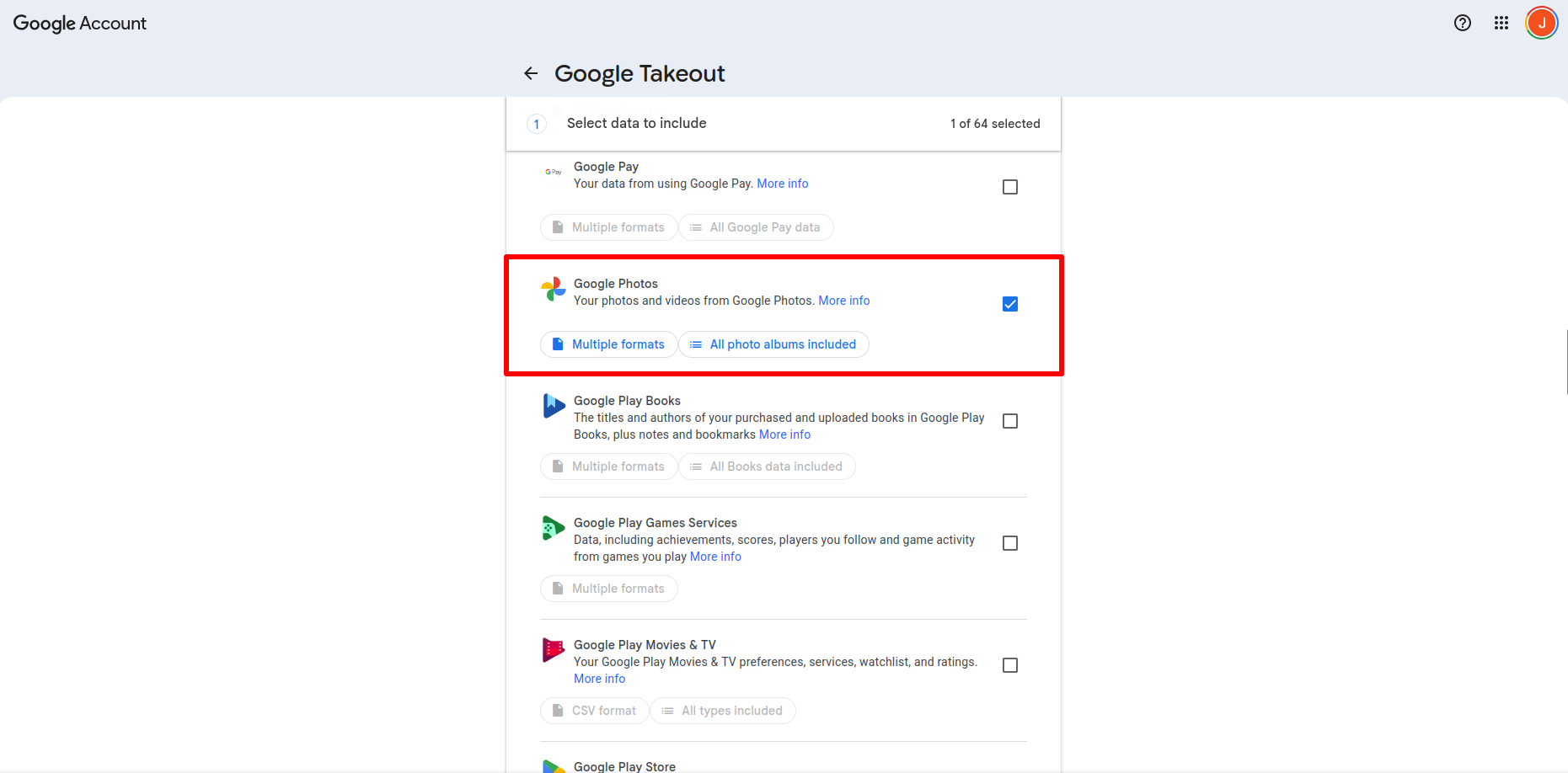
Google offers a feature for exporting your Google Photos (and more account/app data) with Google Takeout. Using this feature, I exported ~200GB of photos and videos I’ve taken over the years into a .zip archive.
Networking
I use Pangolin as a reverse proxy for my services. This allows me to route web traffic incoming to https://immich.mydomain.com to the Immich container running on a machine in my homelab. When protecting my site with Pangolin’s SSO authentication, I found I could not reach the URL when using the Immich Android app. I found this answer on Github that shows the custom request headers required to enable passing an access token.
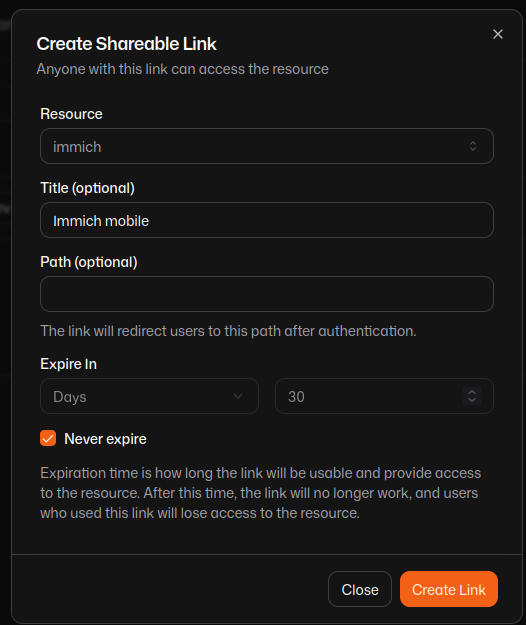
After setting up Immich as an HTTPS resource in Pangolin, create a shareable link and set the new Immich service as the resource. Set this link to “never expire” for convenience; if you set an expiration date, you will need to update the app with a new link each time it expires.
On the next screen, scroll past the QR code and copy the link below it. This is the link you will provide to the Android app. Click the Usage Examples button and note the P-Access-Token-Id and P-Access-Token values.
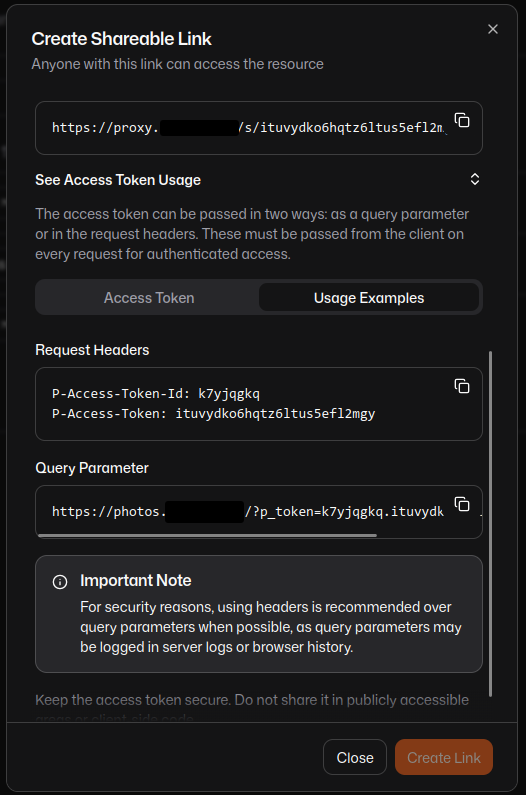
You will use this link and the access token to allow the Immich app to communicate with the server behind the Pangolin proxy.
Setup Android App
In the Immich Android app, navigate to Settings > Advanced > Custom proxy headers, and click “Add new header.” Name the header P-Access-Token-Id and paste the value from when you created the token. Create another header named P-Access-Token.
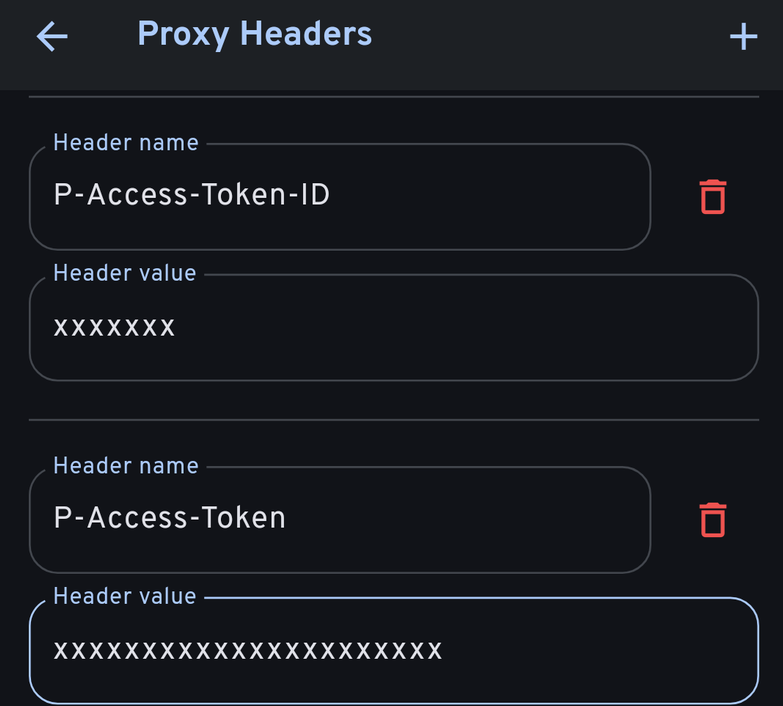
This setup authenticates requests from the Android app to the Pangolin proxy, then passes the traffic to the Immich server.
Upload Photos
I uploaded the collection I exported with Google Takeout to Immich using the immich-go CLI tool. First, I had to create an API key in Immich with the following permissions:
asset.readasset.statisticsasset.updateasset.uploadasset.copyasset.replaceasset.deleteasset.downloadalbum.createalbum.readalbumAsset.createserver.aboutstack.createtag.assettag.createuser.readjob.createjob.read
I also created an admin key in Immich from the administrator account, with full permissions. The immich-go CLI uses the admin token to pause Immich jobs during upload. Othewrise, the regular API key will be used for operations. I created a .env file to store these values:
| |
I wrote a script so I could repeat this upload process in the future if needed. Before running the script, I source the .env file with . .env, exporting the Immich variables to my environment.
This is the script I used to upload my photos:
| |
If I ever need to re-import my collection, or if I create a new Google Takeout with my photos, I can use this script to upload them to my Immich server. The tool works great, it even imported my albums and all of the EXIF data from Google.
Tradeoffs
Immich feels like a true replacement for Google Photos. The app is familiar enough if you’ve used Google Photos. It has many of the same features, like duplicate and face detection, searches for objects like “dog” or “tree,” and creating shareable links for photos, videos, and galleries. But there are several real tradeoffs you need to be aware of, and risks you need to accept, when moving from a hosted photo provider to your own self-hosted setup.
Security
The first and biggest concern is security. A large company like Google has an interest in protecting what you upload to their servers. While they may use this data in objectionable ways, it is undeniably more secure to entrust your memories to a corporation with a dedicated security team and another team of engineers improving the service over time. While Google is famous for abruptly killing useful services, when you self host your media, you are also responsible for how you expose the server to the world (if you do this at all), and protecting the resources from active and passive attacks, and for ensuring your authentication layer and firewall keep unsavory traffic out of your systems.
Backups
The next important factor to consider is backups. When you host your own media collection, you will want to ensure memories aren’t lost from hardware failures or containerization problems. Keeping backups is crucial, and entirely your responsibility. When backing up important data, you should follow the “3-2-1 backups” principle, which boil down to:
- Keep 3 copies of your data: the original data on your primary device, and at least 2 copies.
- Use 2 different storage devices: a PC, external disk, USB flash drive, NAS or SAN, or cloud storage services; pick any 2.
- Keep 1 backup copy off-site: always have a copy of the backup somewhere other than where all of the main data and backups are. For example, if you are backing up to an external drive and a NAS on your home network, keeping a backup copy in an encrypted S3 bucket will prevent total data loss due to damage that might occur at home, like a fire/flood or heat damage.
This strategy can be intense for a homelab, and it increases the size your collection uses on-disk. I generally keep 1 copy somewhere local (an external drive or my NAS), and upload an encrypted copy to Wasabi cloud storage. If you want to avoid cloud hosting, you could also do a “buddy backup,” which is where you keep a storage device at a “buddy’s” location (a relative or friend’s house, or rented networked storage at a local datacenter, etc).
I use Restic for backups, and which makes it simple to keep a local backup, a backup on another machine on my LAN via Rclone SFTP copy, and a remote copy in pCloud or Wasabi S3.
Maintenance
Finally, there is the maintenance cost to consider. Comparing again to a hosted service, the company will have a dedicated team of engineers responsible for keeping hardware and software up to date, managing storage and quotas, and fixing things when they break. When you self-host, you become a 1-person maintenance team. The upside of choosing your own SLA is that you choose your own SLA; the downside is that shit’s broken until you fix it. And if you experience a hardware failure, you also become the data recovery team. This can be a burden, but tools like Dockhand can simplify maintenance operations.
Conclusion
Pulling my pictures and videos out of Google Photos felt great. I have all of my media on a drive in my house, backed up in multiple places where I feel comfortable I won’t lose my collection due to an errant account ban or deletion, and I know my media isn’t being ingested and mixed training data for an AI to use. I have full control of my media, accepting the tradeoffs in maintenance and backup responsibilities to have freedom from a service I grow continually displeased with, and do not trust to continue providing the service without interruption or deprecation on a whim. And best of all, I no longer need to pay Google a subscription to hold my growing photo collection. Goodbye, Google One!